

MassGen v0.0.15: Gemini MCP Notion Integration#
MassGen v0.0.15 introduces the Model Context Protocol (MCP) integration for Gemini agents, enabling seamless access to external tools and services. This case study demonstrates the first implementation of MCP in MassGen through a practical learning content generation task using Notion API.
Prerequisites for MCP Integration#
For Local MCP Servers (stdio):#
Runtime Environment: Install the required runtime for your MCP server
Node.js for npm-based servers (e.g.,
@notionhq/notion-mcp-server)Python for Python-based servers
Go for Go-based servers
API Credentials: Configure via environment variables (
NOTION_TOKEN,DISCORD_TOKEN, etc.)
For Remote MCP Servers (streamable-http):#
No local runtime needed - servers run remotely
Authentication: Provide credentials via HTTP headers or secret management systems
For All Deployments:#
MassGen Configuration: Add
mcp_serverssection to your agent’s backend configuration (see Configuration File Format)
For general MCP setup in MassGen architecture:
MCP Tools Overview & Setup Guide - Complete guide to configuring MCP servers, tool discovery, security settings, and troubleshooting within MassGen
📋 PLANNING PHASE#
📝 Evaluation Design#
Prompt#
“Generate and refine a structured Todo list for learning about LLM multi-agent systems, complete with exciting objectives and fun activities. Each time you have a new version, create a new Notion page with a title and the current date and time (including hours, minutes, seconds, and milliseconds) to store the list. Then, verify that you can access the page and read back the content. Create this page as a subpage under an existing notion page called ‘LLM Agent Research (x)’, where x is either 1 or 2 depending on which you have access to.”
Baseline Config#
Prior to v0.0.15, Gemini agents would use a standard multi-agent configuration like massgen/configs/basic/multi/two_agents_gemini.yaml without any MCP server configuration.
Baseline Command#
massgen --config @examples/basic/multi/two_agents_gemini "Generate and refine a structured Todo list for learning about LLM multi-agent systems, complete with exciting objectives and fun activities. Each time you have a new version, create a new Notion page with a title and the current date and time (including hours, minutes, seconds, and milliseconds) to store the list. Then, verify that you can access the page and read back the content. Create this page as a subpage under an existing notion page called 'LLM Agent Research (x)', where x is either 1 or 2 depending on which you have access to."
🔧 Evaluation Analysis#
Results & Failure Modes#
Before v0.0.15, MassGen’s Gemini integration had notable limitations:
No External Tool Access: Gemini agents could only use built-in capabilities (web search, code execution)
Limited Workflow Integration: No way to interact with productivity tools like Notion, Slack, or databases
Manual Output Management: Users had to manually copy/paste agent outputs to external systems
Isolated Agent Operations: Agents couldn’t persist data or share information through external systems
Success Criteria#
The new MCP integration would be considered successful if:
External API Integration: Agents can successfully create, read, and modify external resources (Notion pages) via MCP
Multi-Agent Coordination: Multiple agents can work with the same external system without conflicts
Data Persistence: Agent outputs are recorded in external systems
End-to-End Validation: Agents can verify final results match intended outcomes (beyond just API success)
🎯 Desired Features#
MCP Client Integration: A complete MCP client implementation for Gemini backend
Automatic Tool Discovery: Agents discover available MCP tools without manual configuration
Session Management: Maintained connections to MCP servers during agent execution
Multi-Server Support: Ability to connect to multiple MCP servers simultaneously
Security Framework: Safe execution of external tools with validation and sanitization
Error Handling: Robust error recovery for network issues and tool failures
🚀 TESTING PHASE#
📦 Implementation Details#
Version#
MassGen v0.0.15 (September 5, 2025)
New Config#
Configuration file: massgen/configs/tools/mcp/gemini_notion_mcp.yaml
Key MCP configuration:
mcp_servers:
  notionApi:
    type: "stdio"
    command: "npx"
    args: ["-y", "@notionhq/notion-mcp-server"]
    env:
      NOTION_TOKEN: "${NOTION_TOKEN_ONE}"
Command#
massgen --config @examples/tools/mcp/gemini_notion_mcp "Generate and refine a structured Todo list for learning about LLM multi-agent systems, complete with exciting objectives and fun activities. Each time you have a new version, create a new Notion page with a title and the current date and time (including hours, minutes, seconds, and milliseconds) to store the list. Then, verify that you can access the page and read back the content. Create this page as a subpage under an existing notion page called 'LLM Agent Research (x)', where x is either 1 or 2 depending on which you have access to."
🤖 Agents#
Agent 1 (gemini-2.5-pro1): Primary content creator with access to Notion workspace “LLM Agent Research (1)” via NOTION_TOKEN_ONE
Agent 2 (gemini-2.5-pro2): Secondary content creator with access to Notion workspace “LLM Agent Research (2)” via NOTION_TOKEN_TWO
Both agents use Gemini 2.5 Pro model with:
Web search enabled in configuration (no web calls observed in this run)
MCP tool access via Notion API
19 available Notion MCP tools including API-post-search, API-post-page, API-patch-block-children
🎥 Demo#
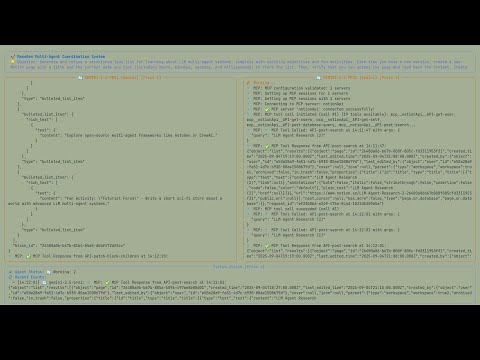
📊 EVALUATION & ANALYSIS#
Results#
🔧 External Tool Integration - The Core Transformation#
A key change is that MassGen agents can now interact with external systems through standardized protocols:
Evidence from logs:
19 MCP tools automatically discovered per agent upon connection
Successful API calls:
API-post-search→API-post-page→API-patch-block-children→API-get-block-childrenReal artifacts created: Actual Notion pages with URLs that persist beyond the MassGen session
Read-back verification by both agents:
API-get-block-childrencalled by Agent 1 (≈14:12:30–14:12:43) and Agent 2 (≈14:12:37–14:12:43) to confirm content accessibility.
🔧 MCP: ✅ MCP Tool Response from API-post-page:
{"object":"page","id":"26480a06-b67b-81b4-b5a5-dbbf472df2cc",...}
🎯 Enhanced Task Completion#
Before: “I can’t create Notion pages, but here’s a todo list you can copy-paste”
After: “I have successfully created and verified a new Notion page with your Todo list… Here is the verified Todo list from the Notion page”
The agents now:
Complete the full requested workflow including external system interactions
Provide URLs to persistent results rather than ephemeral text
🗳️ Voting Evolution#
Agents now vote on execution success not just content quality. From the logs:
“Agent 1 provided a more comprehensive and well-structured Todo list that better addresses the user’s request AND successfully fulfilled all aspects including creating a correctly titled Notion page”
🎯 Conclusion#
The MCP integration in v0.0.15 marks a significant step from isolated AI agents to connected, tool-enabled systems. Key improvements include:
MCP Protocol Integration: Agents have ability to connect to any MCP-compatible server (demonstrated with Notion)
Workflow Integration: integration with productivity tools
Persistent Output: Agent work is automatically preserved in external systems
Broader Implications: This positions MassGen as a platform for building AI agents that can interact with real-world systems, opening possibilities for:
Database management agents
CRM automation
Cloud resource management
Project management workflows
API integration and testing
The success of this case study supports the MCP integration approach and demonstrates clear value for users requiring AI agents that can interact with external systems.
📌 Status Tracker#
✅ Planning phase completed
✅ Features implemented
✅ Testing completed
✅ Demo recorded
✅ Results analyzed
✅ Case study reviewed